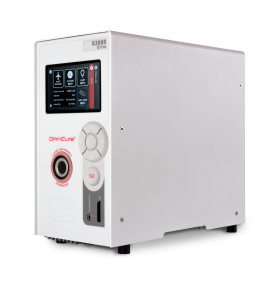
OmniCure S2000 Elite UV Spot Curing System
Maximum Power. Total Control.
High-intensity lamp-based UV spot curing with Closed-Loop Feedback, precise shutter control, and advanced process monitoring for validated manufacturing.
30 / 37 W/cm²
Optical output
CLF
Closed-Loop Feedback
30 ms
High-speed shutter
Web UI · PLC
NFC · StepCure ready
ETIA provides genuine OmniCure® products through authorized channels.
Overview
OmniCure S2000 Elite Product Overview
The OmniCure S2000 Elite is a lamp-based UV spot curing system designed for demanding manufacturing processes that require stable optical output, repeatable dose control, fast exposure cycles, and reliable process monitoring. It is suitable for production environments where curing consistency, traceability, and uptime are critical.
Part of the OmniCure product family. Looking for consumables? See the OmniCure S2000 replacement lamp page.
Key Features
OmniCure S2000 Elite Key Features
OmniCure S2000 Elite Remote Control & Monitoring
Remote control, management, and monitoring are available through the Web UI, allowing users to access system functions, curing profiles, system logs, and software updates from a connected device.
OmniCure S2000 Elite Touchscreen User Interface
The 4.3-inch LCD touchscreen provides intuitive access to system control, settings, exposure operation, and curing-related status information.
OmniCure S2000 Elite StepCure PLC Control
StepCure allows programmable curing sequences with PLC control, helping users manage validated production processes with repeatable exposure control.
OmniCure S2000 Elite Quick Configuration
User-changeable lamp types and optical filters allow faster system configuration and reduced downtime during process changes.
OmniCure S2000 Elite Closed-Loop Feedback (CLF)
Closed-Loop Feedback monitors optical output and helps maintain repeatable irradiance during the curing process.
OmniCure S2000 Elite Intelli-Lamp Technology
Intelli-Lamp technology tracks lamp parameters and supports lamp-life management, helping reduce unexpected downtime.
OmniCure S2000 Elite Intelli-Tap NFC Access Control
Intelli-Tap NFC allows supervisor and administrator access control for locking, unlocking, and protecting process settings.
OmniCure S2000 Elite Optical Performance
The S2000 Elite maintains backward compatibility with the original S2000 process platform, including light guides, optical filters, radiometry accessories, and spectral output.
Documentation
OmniCure S2000 Elite User Guides & Technical Resources
Find the documents and operating guidance you need for installation, setup, calibration, maintenance, and troubleshooting.
OmniCure S2000 Elite Brochure
Product overview, key features, system compatibility, control functions, and performance benefits.
Download BrochureOmniCure S2000 Elite Quick Start Guide
Startup steps, light guide installation, exposure setup, lamp module installation, and optical filter installation.
Download Quick Start GuideOmniCure S2000 Elite User Guide
Full operating manual covering safety, setup, calibration, Web UI, PLC integration, StepCure, maintenance, software updates, troubleshooting, and specifications.
Download User GuideSetup
OmniCure S2000 Elite Setup Guide
OmniCure S2000 Elite Startup
Install the lamp module, install the optical filter, connect power, turn on the system, and allow proper warm-up before operation.
OmniCure S2000 Elite Light Guide Installation
Insert the light guide into the front light guide port until it clicks into place.
OmniCure S2000 Elite Light Ring Status
Use the light ring color to understand system status, including light guide detection, warm-up, Closed-Loop Feedback status, and calibration condition.
OmniCure S2000 Elite Exposure Time Setting
Set exposure time from the Run screen using the touchscreen or navigation controls.
OmniCure S2000 Elite Intensity Setting
Set intensity from the touchscreen or navigation buttons. Calibration is required for W/cm² and W control.
OmniCure S2000 Elite Lock and Unlock
Use PIN or NFC access control to protect validated curing settings.
Troubleshooting
OmniCure S2000 Elite Troubleshooting
OmniCure S2000 Elite Light Guide Not Detected+
Check whether the light guide is fully inserted and properly seated in the light guide port. If the issue continues, contact ETIA technical support.
OmniCure S2000 Elite Lamp Does Not Strike+
Check lamp installation, filter installation, lamp housing panel, power connection, and system status. If the issue continues, contact ETIA technical support.
OmniCure S2000 Elite Closed-Loop Feedback Inactive+
Check calibration status, lamp condition, light guide connection, and filter configuration. If the issue continues, contact ETIA technical support.
OmniCure S2000 Elite Output Intensity Unstable+
Allow sufficient warm-up, verify calibration, inspect the light guide, and check lamp life status. If the issue continues, contact ETIA technical support.
OmniCure S2000 Elite Filter Not Recognized+
Check whether the optical filter cartridge is properly installed and fastened. If the filter is not properly installed, the system may not recognize it and the lamp may not strike.
OmniCure S2000 Elite System Locked+
Use the configured PIN, supervisor card, or administrator NFC card depending on the access control setup. If the issue continues, contact ETIA technical support.
Still stuck? Contact ETIA technical support →
Service & Support
OmniCure S2000 Elite Lamp Replacement & Maintenance Support
ETIA can support OmniCure S2000 Elite users with replacement lamps, optical filters, light guides, calibration guidance, maintenance, repair support, and troubleshooting.
OmniCure S2000 Elite Replacement Lamp Support
Support for standard curing lamp and surface cure lamp selection.
OmniCure S2000 Elite Optical Filter Support
Support for selecting and replacing optical band-pass filters.
OmniCure S2000 Elite Light Guide Support
Support for light guide selection, installation, cleaning, and replacement.
OmniCure S2000 Elite Calibration Support
Support for R2000 radiometer calibration and repeatable irradiance control.
OmniCure S2000 Elite Maintenance & Repair Support
Support for routine maintenance, troubleshooting, and repair coordination.
Why ETIA
Why Buy OmniCure S2000 Elite from ETIA
ETIA supports manufacturers across Thailand, Vietnam, Hong Kong, and Southeast Asia with genuine OmniCure products, application consultation, local supply, installation training, lamp replacement guidance, maintenance, repair support, and troubleshooting.
Genuine OmniCure Products
Application-Driven Selection
Local Supply & Fast Response
Long-Term Service Support
FAQ
OmniCure S2000 Elite FAQ
Where can I download the OmniCure S2000 Elite user guide?+
You can download the OmniCure S2000 Elite User Guide, Quick Start Guide, and Brochure directly from the User Guides & Technical Resources section on this page. The User Guide covers safety, setup, calibration, Web UI, PLC integration, StepCure, maintenance, and troubleshooting.
How do I install the OmniCure S2000 Elite light guide?+
Insert the light guide into the front light guide port until it clicks into place. The light ring confirms detection. See the OmniCure S2000 Elite Quick Start Guide for step-by-step installation.
What do the OmniCure S2000 Elite light ring colors mean?+
The light ring color indicates system status — including light guide detection, warm-up, Closed-Loop Feedback status, and calibration condition. Refer to the OmniCure S2000 Elite User Guide for the full color reference.
Why does the OmniCure S2000 Elite lamp not strike?+
If the lamp does not strike, check lamp installation, optical filter installation, the lamp housing panel, the power connection, and system status. If the issue continues, contact ETIA technical support.
How do I replace the OmniCure S2000 Elite lamp?+
The OmniCure S2000 Elite uses a user-changeable lamp module. ETIA can supply genuine replacement lamps and provide lamp replacement, installation, and calibration guidance. Contact ETIA for OmniCure S2000 Elite lamp replacement support.
How do I install an OmniCure S2000 Elite optical filter?+
Install the optical filter cartridge into the filter slot and ensure it is properly seated and fastened. If the filter is not properly installed, the system may not recognize it and the lamp may not strike.
Does the OmniCure S2000 Elite support PLC automation?+
Yes. The OmniCure S2000 Elite supports StepCure PLC control with programmable curing sequences and PLC output channels, enabling validated, repeatable automated production processes.
Can ETIA provide OmniCure S2000 Elite troubleshooting support?+
Yes. ETIA provides OmniCure S2000 Elite troubleshooting, lamp replacement, optical filter and light guide support, calibration guidance, maintenance, and repair coordination across Thailand, Vietnam, Hong Kong, and Southeast Asia.
Need Help with OmniCure S2000 Elite Selection, Setup, or Troubleshooting?
ETIA engineers can help with OmniCure S2000 Elite product selection, lamp and filter configuration, light guide setup, calibration guidance, maintenance, repair support, and technical troubleshooting.